
Green screen to transparent GIF
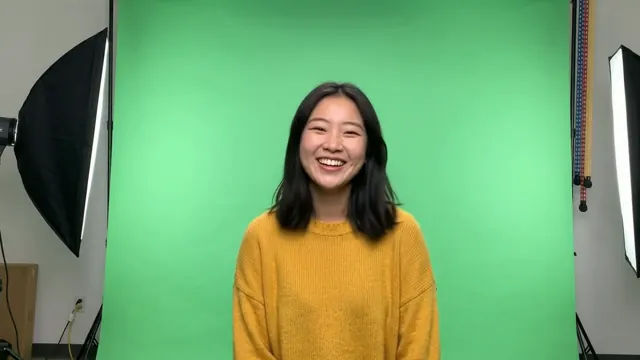
Drop a green-screen video and get an animated GIF with a see-through background. The AI removes the green — and the studio around it — on every frame.
- Free
- No watermark
- No sign-up
- Your video never leaves your device
Transparent sticker
How it works
- 1Drop the videoAny green- or blue-screen clip. It doesn’t matter if lights or stands are in the shot.
- 2The AI keys it outThe subject is found on every frame, so the green, the stands and the room all go. Tap to fix anything.
- 3DownloadTransparent GIF for anywhere, or WebP / APNG to keep soft edges like hair.
Before and after
Green screen tips
No perfect screen neededCreases, uneven light or a screen that doesn’t fill the frame are fine: the AI looks for the subject, not just the colour.
Exact colour keyingPrefer classic keying? Switch on Advanced → Background → Pick colour and click the screen. How it works.
Green edges?Light reflecting off the screen can tint edges. The cut-out cleans this up; an outline style hides any leftovers.
Plain walls tooA plain coloured wall works just as well — it’s detected and cleaned up automatically.
Made with GifNoBg
Questions
How do I remove a green screen without software?
Drop the video on this page. The background is removed in your browser — nothing to install.
Does it work with a blue screen or plain wall?
Yes. The AI finds the subject whatever the background colour; for exact colour keying use Advanced → Pick colour.
Will hair edges look good?
Download WebP or APNG for soft, natural hair edges. GIF can only do hard edges.
Is my footage uploaded?
No. It’s processed on your device and never leaves it.
Is it free?
Yes, with no watermark and no sign-up.
Learn more
More free tools
Ready? It takes a minute or two.
Make a sticker