
“Your files are too powerful.” Discord's polite way of saying your video is over the limit. Free accounts can send files up to 10 MB, and a phone video is often 50 or 100 MB. Here's how to get it under the limit in a minute, in your browser, without losing the sound and without uploading your video anywhere.
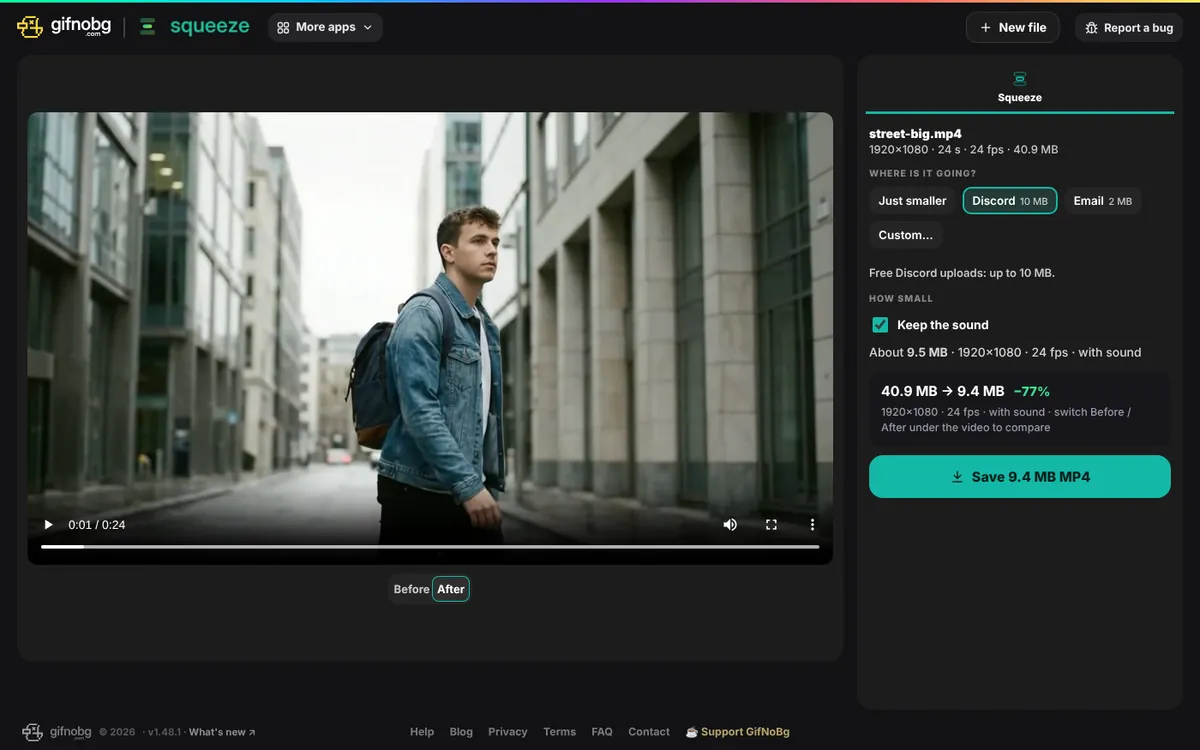
Squeeze it for Discord
- Open gifnobg.com/squeeze (free, no sign-up).
- Drop your video onto the page, or tap Choose files. MP4, MOV (iPhone) and WebM all work.
- Under Where is it going? pick Discord. Squeeze works out the size and quality that fit under 10 MB and shows what you'll get.
- Keep Keep the sound ticked and tap Squeeze video.
- Switch Before and After under the video to compare, then Save.
What if it still doesn't fit?
The longer the video, the less room each second gets. Squeeze lowers the size and smoothness a little for long clips, and if a video is simply too long for 10 MB it tells you, instead of handing you a file that won't upload. Then:
- Cut it shorter. Most moments worth sharing are under 30 seconds.
- Turn it into a GIF with Video to GIF: pick just the moment and set a size limit.
- Pick a bigger limit with Custom if you have Nitro (50 MB or 500 MB).
Emails and websites too
The same trick works for email (pick Email or type your own limit) and for videos on a website: Just smaller with Smaller or Tiny makes them load much faster.
help centreMake a GIF or picture smallerMake GIFs, PNGs, JPGs and WebPs smaller in your browser: pick where it's going (Discord, Discord or Slack emoji, email) and get the best-looread the guide →Free, no watermark, and your video never leaves your device. Squeeze a video now.