Make an animated Twitch emote
Turn a video, GIF or pictures into an animated Twitch emote: a 112×112 GIF under 1 MB with at most 60 frames, see-through and ready to upload. Free, nothing uploaded.
Twitch accepts animated emotes as a GIF exactly 112 × 112 pixels, up to 1 MB and at most 60 frames. GifNoBg and the GIF Maker make one that fits all of that for you. Animated emotes are for Twitch Affiliates and Partners.
From a video, with the background removed
- Open your video at gifnobg.com and let the background be removed.
- Trim it to 1–3 seconds. Emotes are seen tiny, so one clear move works best.
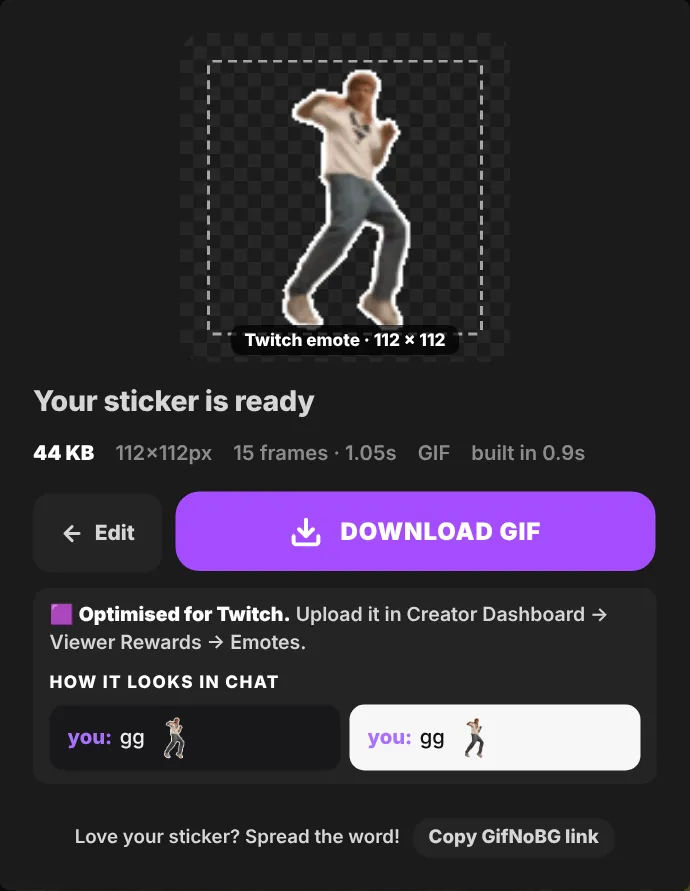
- On a computer: switch on Studio, go to Export and choose Twitch emote. On a phone: pick Twitch under Optimise for….
- Press Download. Under the result, How it looks in chat shows the emote in a dark and a light chat at its real size, so you can check it still reads when it's small.
From any other app
- Open the GIF Maker, Effecto, Puppet, Wiggle, Morph or Video to GIF and make your animation.
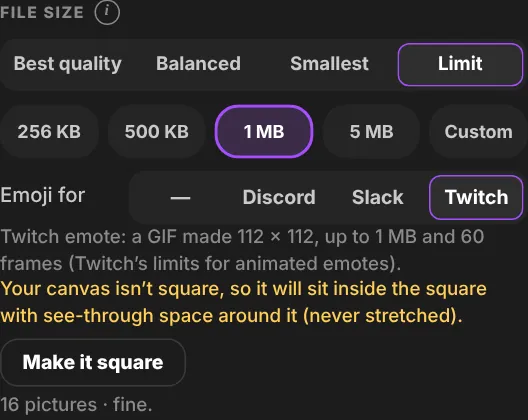
- In Save, tap Ready for: Twitch emote at the top. That sets everything: a GIF, 112 × 112, up to 1 MB and 60 frames.
- If your canvas isn't square, your animation sits inside the square with see-through space around it. It's never stretched. Tap Make it square if you'd rather fill the whole square.
- Tap Make & download GIF, check How it looks in chat; it downloads by itself.
More than 60 frames? Some are left out evenly so it still plays at the same speed. For the smoothest emote, keep it short.
Upload it to Twitch
In Twitch, open Creator Dashboard → Viewer Rewards → Emotes, add an emote and upload the GIF (the exact menu names can change). Twitch makes the smaller sizes from it.

Try it with your own videoFree, no sign-up, no watermark — and your video never leaves your device.
Make a sticker